
Field Notes
In the last post, I gave you a test for your software.
Can an agent actually use it?
That question only works if we define the worker.
Right now, the word “agent” is getting thrown at everything.
Ask a question in a chat window? Agent. Click a button that writes an email? Agent. Add an AI sidebar to a dashboard? Agent.
I get why. Everyone can feel the shift. But if we use the same word for every AI feature, we lose the ability to make good decisions.
You cannot build an agent-ready stack if you cannot tell the difference between a chat box, a workflow, a tool, and a worker.
So here is the plain-English version.
A chatbot is a place to talk.
An agent is a system that can work.
The more real work an agent can touch, the more the rules matter.
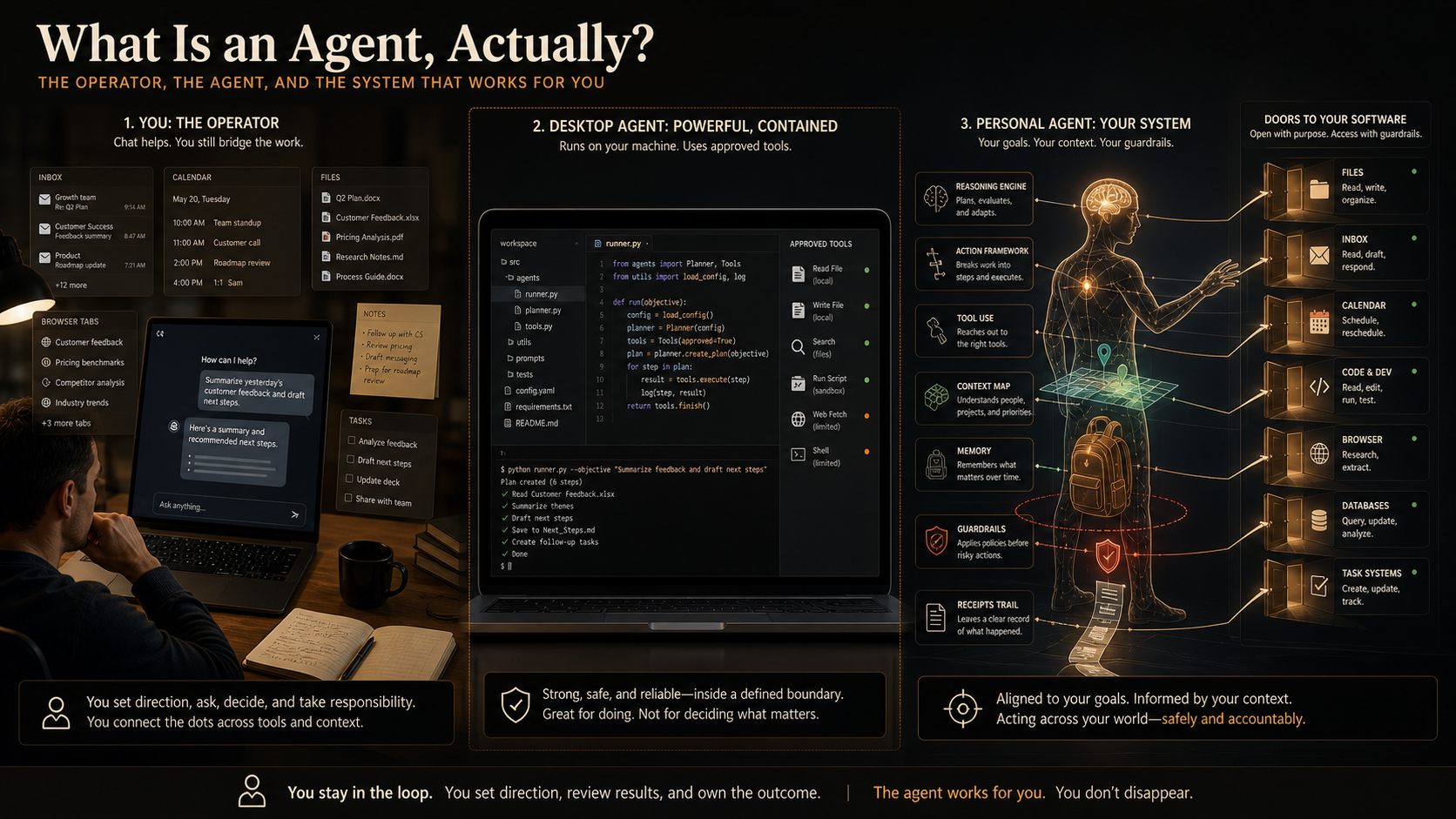
The model is the brain: the trained system doing reasoning, language, prediction, or generation.
The harness is the body: the wrapper that gives the model instructions, tools, permissions, and a place to act.
The tools are the hands.
The context is the map.
The memory is the backpack.
The workflow is the route.
The rules are the guardrails.
The receipts are the trail it leaves behind.
Once you see those pieces, the market gets easier to understand. ChatGPT is often a great conversation surface. Claude can be excellent for deep reasoning and long context. Claude Code and Codex are built for repo work. MCP helps agents reach outside tools and data sources.
The category names matter less than the question underneath them:
Can this system take a job, use the right context, operate the right tools, stop at the right places, and show me what happened?
That question is the practical line.
If it only answers, you are using chat.
If it can move through a workflow with tools, rules, and proof, you are getting closer to an agent.
The mistake is expecting the chat box to carry the whole future.
The chat box is useful.
But the future of work is not a better answer box. It is a new kind of operating surface where humans and agents can pass work back and forth without everything getting trapped in one person’s browser tabs, memory, and follow-up list.
The last post focused on software for exactly that reason.
If your tools are locked rooms, your agents will stand outside and talk about the work.
If your tools have doors, your agents can start helping with the work.
Now we can define the worker standing at the door.
Playbook
Here is the agent test I would use.
When someone says, “we have an agent,” ask two questions first.
What kind?
And how far can it work?
There are three levels I would separate in my head.
1. Chat surfaces
Most people already understand the first level.
You open a window. You ask a question. The model answers.
That can be useful. It can help you think, draft, summarize, and get unstuck.
But most chat surfaces still depend on you to carry the work back into the business. You copy the answer, open the software, click the buttons, send the email, and become the bridge.
Still valuable. It just belongs in the right category.
2. Desktop and coding agents
Then there are agents that can work inside a bounded environment.
Claude Code is a good example. It can read a codebase, edit files, run commands, and work through development tools. I would call that a coding agent.
Claude Desktop with connected tools sits nearby. It can feel like a co-worker because it has more access than a plain chat window, especially when you connect local tools or MCP servers.
That makes it meaningfully different from chat.
The boundary matters. The agent is usually strongest inside the environment it was designed for: the repo, desktop session, connected folders, allowed tools, and current task.
So when someone looks at Claude Code and says, “Wait, am I already using an agent?” my answer is yes, but it is a specific kind of agent.
The useful question is what work surface it can actually reach.
3. Personal operating agents
Then there is the thing I am more interested in.
OpenClaw and Hermes-style systems are closer to general personal agents.
They are built around the operator’s actual environment: files, notes, inbox, calendar, browser, code, recurring jobs, memory, approvals, and receipts.
That makes them more powerful and more dangerous. They can reach across more of the business, remember context, keep watch, come back later, and coordinate work that does not live inside one app.
So the bar gets higher.
An agent gets better when the extra reach is paired with rules, memory, review, and receipts.
That brings us back to the practical checklist.
Ask seven questions.
1. What job does it have?
An agent needs a job.
“Help with marketing” is too loose.
“Draft three follow-up emails from this call transcript and stop before sending” is a job.
The job gives the model a target. Without that, it starts guessing what useful means.
2. What context can it read?
An agent is only as good as the context it can reach.
Context might be customer records, call transcripts, SOPs, calendar events, project status, product docs, prior decisions, or examples of good work.
The agent does not need access to everything.
It needs the right context for the job.
If the facts are missing, the agent should say that. If it invents the missing facts, you have a trust problem.
3. What tools can it use?
Tools are what let the agent act.
Can it search files, read an inbox, query a database, create a draft, update a task, run a test, or generate a report?
If the system cannot touch the work surface, it may still be useful, but it is mostly advisory.
The jump happens when the system can use tools safely.
4. What rules does it follow?
Rules are the difference between useful help and anxiety.
Draft the email. Do not send it. Recommend the price change. Do not push it live. Pull the Stripe record. Do not assume payment from a screenshot. Ask before external communication.
Those rules sound boring until you realize they are what let you trust the system with real work. They keep the operator from becoming the hidden approval layer, which is why I keep coming back to the bottleneck problem.
5. Where does it stop?
A useful agent needs brakes.
It should stop when facts are missing, when the risk changes, when the next move needs judgment, or when the job is complete.
An agent that only knows how to continue is a liability.
The stop sign is part of the design.
6. What proof does it bring back?
No proof, no trust.
After the agent works, you should be able to inspect the result.
What did it read? What did it change? What did it skip? What failed? What still needs approval?
Proof can be a file path, a test result, a sent-items receipt, a version log, a screenshot, a checklist, a transcript link, or a structured note.
The format can vary. The principle should not.
7. Can it repeat the workflow?
One good run is interesting.
A repeatable workflow is an asset.
If the agent can run the same process next week with updated context, the same rules, and a review trail, you have something your business can build on.
At that point, AI starts becoming infrastructure instead of a clever one-off.
Orientation
Once you define an agent this way, the tool market gets less confusing.
You stop asking whether a product “has AI.” You ask what job the system can do, what context it can read, what tools it can use, where human review belongs, and what proof comes back.
That bridge starts in the last post.
The Agentic Tool Test was about your software stack.
This one is about the worker your stack needs to support.
Next, we need to map the tool categories themselves.
Chatbots. Coding agents. Browser agents. Personal agents. Workflow automation. MCPs. APIs. CLIs.
The market gets clearer when you ask what job each tool is actually built to do.
Agent-ready software matters for this reason.
A worker with no way into the tool becomes advice.
A worker with a safe door into the tool can help.
For now, use the simple test.
Job. Context. Tools. Rules. Stop signs. Proof. Repeatability.
If those pieces are missing, you probably have chat.
If those pieces are present, you may have an agent.
Comment below with the AI tool you use most right now, and I will tell you which category I think it belongs in.
— Brian